

Haha thank you! I’m so glad you like them!Originally Posted by N7

Awesome I’ll definitely try using this from here on out. It’ll definitely be useful. Thanks so much!
Results 141 to 150 of 154
Thread: Janobii's Forest
-
03-14-2019, 08:41 AM #141
 The Queen of Shaymin
 Site EditorAdministrator
- Join Date
- Dec 2014
- Location
- US
- Posts
- 17,593
-
03-18-2019, 04:29 PM #142
The Queen of ShayminSite EditorAdministrator
- Join Date
- Dec 2014
- Location
- US
- Posts
- 17,593
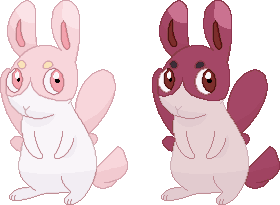
Okay I updated these guys to have anti-aliasing and updated the colors to reduce the odd out pixels! @Suicune's Fire is this any better?
-
This post has been liked by:
-
03-19-2019, 07:22 AM #143your turn to roll
- Join Date
- Feb 2013
- Posts
- 13,468
I think it's even harder to see the shading now. xD The contrast is waaaay too low. You need a much more definition between shades. That darker shade needs to be far, far darker.
I couldn't actually tell where the anti-aliasing was because again the shades are just too similar. However I could tell that it was fuzzy and zoomed in and, well, anti-aliasing should be done sparingly, otherwise you have that fuzz effect. It's meant to soften edges and make it less pixelly but now it's hugging the entire lineart. You've got a lot of banding going on as well, which is when the shading doubles up with the lineart.
Banding
This video is good at showing how to anti-alias gently to make sprites less flat, but not fuzzy.
Also...the two bunnies together now have 80 colours in the palette . o__o By the way, it would be much easier to just work with the first one and get it finished before worrying about the shiny variant. Then you can just go into the colour palette and change each colour individually to make the shiny once the original is done. :) So you don't have to recolour it manually.
-
03-19-2019, 05:10 PM #144
The Queen of ShayminSite EditorAdministrator
- Join Date
- Dec 2014
- Location
- US
- Posts
- 17,593
I'll take a look at this all later so thank you for doing all of this. Personally the shading shows up just fine for me so it might be your computer screen. Originally Posted by Suicune's Fire
I will say though while I really appreciate the tutorial, I really don't like it when people edit my stuff without asking me first, especially since I spent several days working on this. It's hard to explain and it's really kinda stupid but even if the changes were minor, because I didn't do it myself it feels like the sprite isn't mine anymore since it's not in my style. I'm still learning and I learn a lot better by being able to do it hands on rather than seeing someone else do it for me. As a result, I'm probably going to just abandon this sprite since any alterations I make at this point will look too similar to yours and I won't feel like they're original in thought or design. I know you had good intentions, and I appreciate that, so I don't want you to feel like this is your fault since you didn't know. I should've stopped you this morning but I didn't want your efforts to go to waste. However, because it feels like I'm just going to be copying you at this point, I'm just going to abandon this design.
I'll draft up a new design... sometime. It's might take a while because of school and just overall motivation being at a low, or it might be a rather quick turn around due to a burst of inspiration. We'll see. But I'll keep in mind what you said. Thank you for all of this.Last edited by Noblejanobii; 03-19-2019 at 06:50 PM.
-
03-19-2019, 10:41 PM #145your turn to roll
- Join Date
- Feb 2013
- Posts
- 13,468
Ah sorry about that. I didn't mean to do that. I'll take it down. :) I wasn't sure how to describe what I meant without showing you and then yeah...kind of went overboard. D: Had I known, I wouldn't have done it. I'm sorry. :( Originally Posted by Noblejanobii
-
03-20-2019, 10:13 AM #146
The Queen of ShayminSite EditorAdministrator
- Join Date
- Dec 2014
- Location
- US
- Posts
- 17,593
No no don't feel bad! I know you had the best of intentions and were trying to help! I will definitely take your other advice into account though. Like I said, I have a bit of school work I need to do anyway so I might not get to work on this again for a few days anyway so don't worry about it. And if you have any minor recommendations that is always much appreciated. Originally Posted by Suicune's Fire
-
This post has been liked by:
-
05-16-2019, 02:44 AM #147
The Queen of ShayminSite EditorAdministrator
- Join Date
- Dec 2014
- Location
- US
- Posts
- 17,593
Alright so we're back with the next starter! Mostly was using this to time myself for commission prices but I think it turned out very well.

-
This post has been liked by:
-
05-28-2019, 12:14 AM #148
The Queen of ShayminSite EditorAdministrator
- Join Date
- Dec 2014
- Location
- US
- Posts
- 17,593
Finished a sprite commission featuring Ronas and Bassui of the comic, the Essence of Being.


-
06-15-2019, 12:57 PM #149
The Queen of ShayminSite EditorAdministrator
- Join Date
- Dec 2014
- Location
- US
- Posts
- 17,593
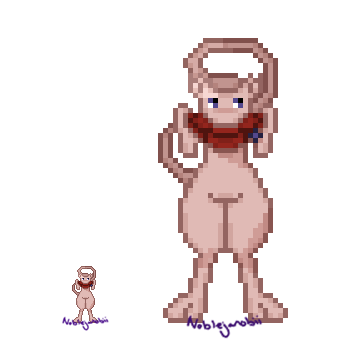
Redid this sprite to reflect some design changes.

And finished a commission for Arnisd featuring Ral and Grey from PMD: Explorers of Life.

Last edited by Noblejanobii; 06-15-2019 at 02:23 PM.
-
06-23-2019, 05:37 AM #150growing strong
Site EditorSenior Administrator
- Join Date
- Feb 2013
- Location
- Route 1
- Posts
- 10,750
Ooh I really love that Mew! Also did you draw that person from scratch? :O Either way, you did a really good job. People are so difficult!



 Reply With Quote


Bookmarks